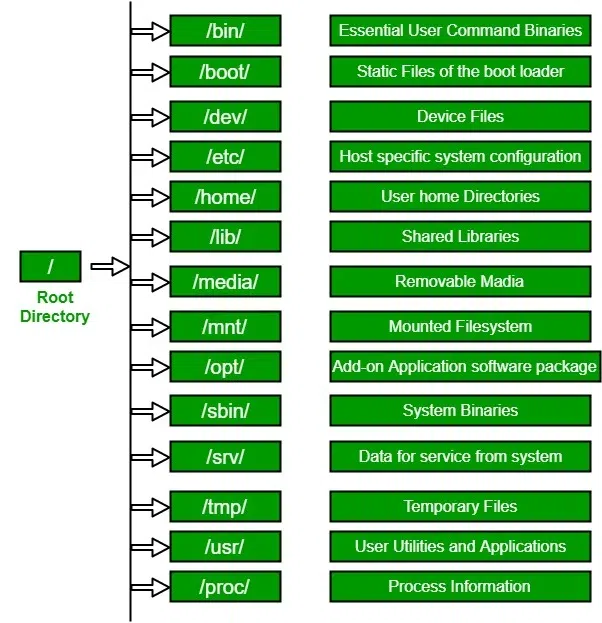
Understanding the Linux filesystem hierarchy is essential for navigating and managing resources effectively.
- / – Root directory
- /home – User home directories
- /etc – Configuration files
- /var – Variable data like logs
- /usr – User applications and binaries
The structure follows the Filesystem Hierarchy Standard (FHS). Here are some of the essential directories:
The Linux file system is organized in a tree-like hierarchy that begins at the
root directory (/). All other directories and files branch from this single point.
Here are visual examples of the Linux file system structure and descriptions of the common directories:
Key Linux Directories
The structure follows the Filesystem Hierarchy Standard (FHS). Here are some of the essential directories:
/(Root): The primary directory from which all other files and directories originate./bin(Binaries): Contains essential user command binaries (e.g.,ls,cat,mv) that are needed for the system to boot and run./boot: Stores files required for booting the system, such as the Linux kernel, initial RAM disk image (initramfs), and boot loader configuration files./dev(Devices): A virtual directory containing special files that represent hardware devices (e.g., hard drives, terminals)./etc(Etcetera): Contains system-wide configuration files and scripts./home: Contains the personal directories for regular users. For example, a user nameduser01would have their home directory at/home/user01./lib(Libraries): Contains essential shared libraries needed by the binaries in/binand/sbin./media: A mount point for removable media devices such as USB drives and CDs./mnt(Mount): A temporary mount point for mounting file systems, such as network shares./opt(Optional): Used for installing optional application software that is not part of the core system./proc(Processes): A virtual filesystem that provides a window into the kernel and active processes, containing real-time system information./root: The home directory for therootsuperuser, separate from other user home directories./sbin(System Binaries): Contains essential system administration binaries (e.g.,fdisk,mke2fs,shutdown) that typically only the root user can run./tmp(Temporary): A directory for temporary files created by various programs and users. These files are often deleted upon system reboot./usr(Unix System Resources): The largest portion of the file system hierarchy, containing secondary hierarchy for user data, programs, and libraries (e.g.,/usr/bin,/usr/lib,/usr/share)./var(Variable): Stores variable data files, such as system logs (/var/log), databases, and temporary files that are not deleted on reboot.